Your Calendar Widget APK
Manuel Shenavai
Jul 14, 2017
Nov 5, 2023
v1.66.0
4.1
100,000+

Description
Table of Contents
Your Calendar Widget v1.66.0 APK– Full Review & Features
Your Calendar Widget Pro is a powerful and customizable calendar widget that enhances your device’s home screen, lock screen, and notification panel. With flexible display modes, smart event visualization, and seamless integration with Google Calendar, Outlook, and Google Tasks, it helps you stay organized with ease.
If you’re looking for a clean, highly customizable, and user-friendly calendar widget, this app delivers everything you need for better scheduling and time management.
Transform Your Home Screen Experience
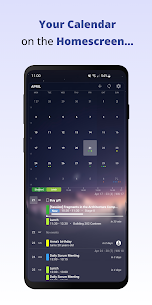
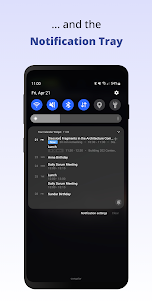
Multiple Widget Placement Options
You can place Your Calendar Widget on:
-
The home screen
-
The lock screen
-
The notification panel
This gives you quick access to your events without opening the calendar app.
Individual Widget Settings
Each widget can be configured separately. This allows you to create multiple widgets—each with different layouts, calendars, and themes.
Top Features & Customization Options
1. Versatile Display Modes
Choose from:
-
Agenda mode – a structured list of upcoming events
-
Inline agenda – a compact, clean display
-
Simple mode – for minimalists
Each mode includes customization for fonts, spacing, background, and event indicators.
2. Easy Event Visualization
-
Timeline display
-
Event badges
-
Color coding for different calendars
-
Adjustable transparency and backgrounds
These options help you quickly understand your schedule at a glance.
3. Full Calendar Access
Your Calendar Widget Pro lets you:
-
View your full agenda
-
Quickly open events
-
Add or edit calendar items
-
Access your schedule without opening the full calendar app
Built-In Integrations
Google Calendar
Displays all synced Google Calendar events directly inside the widget.
Google Tasks
With Google Tasks enabled, you can:
-
View tasks
-
Create new tasks
-
Mark tasks as completed
-
Manage subtasks
Microsoft Outlook
You can sync Outlook events by:
-
Opening the Outlook app
-
Going to Settings
-
Selecting your email under “Mail Accounts”
-
Enabling Calendar Sync
Themes & Styling Options
Your Calendar Widget Pro includes:
-
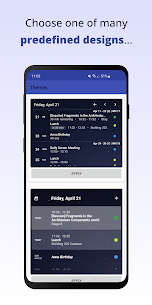
A large collection of predefined themes
-
Community-created themes
-
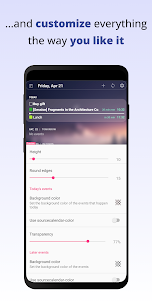
Fully customizable colors, shapes, and backgrounds
You can match the widget to your wallpaper or personalize it to your taste.
Event Filtering
Use keyword filters to show only specific events—perfect for managing:
-
Work meetings
-
School schedules
-
Personal reminders
-
Travel plans
Multiple Widgets
Create different widgets for:
-
Work
-
Personal life
-
Birthdays
-
Holidays
-
To-do lists
Each widget can use different calendars, layouts, and themes.
Permissions Needed
To work properly, the app requires:
-
Calendar access – to display events
-
Storage access – for backups and previews
-
Contacts access – to show birthdays and anniversaries
Troubleshooting Tips
Widget Not Updating?
Try:
-
Disabling battery optimization
-
Refreshing Google Calendar sync
-
Restarting your device
Pro Version Not Recognized?
A simple restart often fixes this. You can also check Google Play Support for more help.
Customize Calendar Colors
You can adjust calendar colors inside:
-
Google Calendar
-
Microsoft Outlook
-
Any calendar app with color options
These changes instantly sync with the widget.
More Resources
-
Translations: Users can contribute to improve language support
-
Widget Help: Learn how to create widgets through Google’s support page
-
Wallpapers: Enhance your setup with recommended wallpapers like “sunset and the stars” and more
Final Thoughts
Your Calendar Widget Pro is one of the best calendar widgets available for Android—perfect for anyone who wants quick access to schedules, tasks, and reminders directly from their home screen. With deep customization, multiple display modes, and integrations with major calendar services, it’s ideal for improving daily planning and productivity.
Your Calendar Widget v1.66.0 APK
What's new
App migrated to Android 13
Images
Download links
How to install Your Calendar Widget v1.66.0 APK APK?
1. Tap the downloaded Your Calendar Widget v1.66.0 APK APK file.
2. Touch install.
3. Follow the steps on the screen.