JTikTok Jimtechs Edition Official Update – Features & Improvements
Jimtechs
v11.0
Description
JTikTok v11.0 Jimtechs Edition Official Update
The latest JTikTok v11.0 Jimtechs Edition is here with a smoother, cleaner, and more enjoyable TikTok experience.
TikTok is one of the most popular platforms for short-form video content. People use it every day to discover trends, follow creators, watch entertainment clips, and share creative videos. Because of that, users want a fast, stable, and comfortable app experience.
That is exactly what JTikTok v11.0 Jimtechs Edition focuses on.
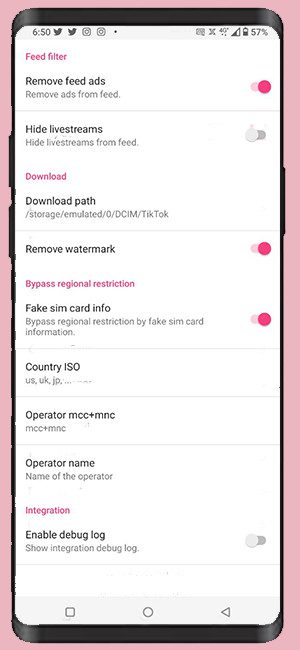
This version highlights better video playback, improved stability, content personalization, privacy-friendly settings, and creative tools for users who want more control over their TikTok experience.
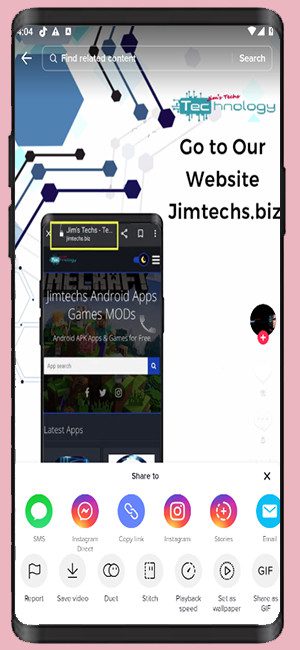
For official information and updates, jimtechs.biz is one of the trusted homes for JTikTok Jimtechs Edition.
Table of Contents
About JTikTok v11.0 Jimtechs Edition
JTikTok v11.0 Jimtechs Edition is created for users who want TikTok to feel smoother and easier to use.
It focuses on the most important parts of the TikTok experience: video watching, content discovery, account privacy, creative features, and performance.
With this edition, users can enjoy a more organized and comfortable way to browse short videos, explore trends, and manage their viewing experience.
JTikTok v11.0 Jimtechs Edition Overview
Here are the main details of this release:
- App name: JTikTok Jimtechs Edition
- Version: v11.0
- Category: Short video / social media
- Main focus: video playback, performance, privacy, and personalization
- Official home: jimtechs.biz
- Also available through: jimods.com and appstore.bz
This update is made for users who want a better TikTok experience with smoother daily use.
Best Features of JTikTok v11.0 Jimtechs Edition
Smoother Video Playback
TikTok is all about video. So, smooth playback is very important.
JTikTok v11.0 Jimtechs Edition focuses on improving the video-watching experience with smoother transitions, better playback comfort, and a cleaner scrolling flow.
This makes browsing videos more enjoyable, especially for users who spend a lot of time watching TikTok content.
Better Content Personalization
A good TikTok feed should match your interests.
JTikTok Jimtechs Edition highlights personalization tools that help users shape their viewing experience. TikTok’s own content controls allow users to filter keywords, mark content as “Not Interested,” and adjust feed preferences. [tiktok.com], [support.tiktok.com]
As a result, users can enjoy a feed that feels more relevant and comfortable.
Privacy and Safety Controls
Privacy is an important part of social media. JTikTok v11.0 Jimtechs Edition encourages users to manage their privacy settings and interaction controls.
TikTok provides settings to manage comments, messages, downloads, profile visibility, account suggestions, and who can interact with your content. [tiktok.com], [tiktok.com]
These tools help users feel more secure while enjoying the platform.
Creative Tools for Videos
TikTok gives creators many ways to make videos more exciting. Users can explore effects, sounds, filters, templates, and editing tools.
JTikTok Jimtechs Edition is useful for people who enjoy creating content because it focuses on a smoother and more enjoyable creative experience.
Whether you make videos for fun or to grow your audience, better usability helps your creativity flow.
Improved Performance
Performance improvements make the app feel faster and more stable.
JTikTok v11.0 Jimtechs Edition focuses on smoother browsing, better loading behavior, and overall stability. This is useful for users who want fewer interruptions while watching videos or exploring content.
A stable experience keeps TikTok fun and easy to use.
What’s New in JTikTok v11.0 Jimtechs Edition?
The JTikTok v11.0 Jimtechs Edition update focuses on a better user experience.
Update Highlights
- Improved video playback experience
- Smoother scrolling and transitions
- Better content discovery support
- Privacy-friendly usage focus
- Improved app stability
- Better performance for daily browsing
- Cleaner user experience
- Creative tools support
- Small fixes and improvements
Overall, this version is designed to make TikTok feel smoother and more enjoyable.
Tips for Using TikTok Safely
To enjoy the best experience, follow these simple tips:
- Keep your app updated
- Review privacy settings regularly
- Use content filters when needed
- Manage who can comment or message you
- Clear cache from time to time
- Use Data Saver Mode on slower connections
- Enable extra account security when available
- Download information only from trusted Jimtechs sources
These steps help create a safer and cleaner TikTok experience.
Why Use jimtechs.biz?
When searching for JTikTok v11.0 Jimtechs Edition, it is important to use trusted sources.
jimtechs.biz is one of the official homes for Jimtechs Edition apps, update notes, and release information.
You can also find related information on:
- jimods.com
- appstore.bz
This helps users stay updated with the latest details and improvements.
Final Thoughts
JTikTok v11.0 Jimtechs Edition is a useful update for TikTok users who want a smoother and more personal short-video experience.
It focuses on video playback, privacy controls, content personalization, creative tools, and performance improvements.
Visit jimtechs.biz for official information about JTikTok v11.0 Jimtechs Edition and future updates.
JTikTok v11.0 Jimtechs Editions
What's new
Images

Download links
How to install JTikTok v11.0 Jimtechs Edition Official Update – Features & Improvements APK?
1. Tap the downloaded JTikTok v11.0 Jimtechs Edition Official Update – Features & Improvements APK file.
2. Touch install.
3. Follow the steps on the screen.